
nyssr.net and RemoteSkin v2.4.0
Release notes and installation information for nyssr.net and RemoteSkin version 2.4.0.
Changes 2.4
This version primarily includes bug fixes and changes related to the support of Language Level 23.
Description
The nyssr.net kernel consists of a single JAR file:
- NY_Kernel-2.4.0.jar
The kernel requires two very small third party libraries:
| from | file | size | |
|---|---|---|---|
| JetBrains s.r.o. | annotations-26.0.1.jar | 31.170 bytes | |
| json-simple-1.1.1.jar | 23.931 bytes |
You can find the kernel and the third party libraries in the lib directory.
All other functionalities of nyssr.net are loaded as plugins at runtime. You
can find the plugins in the plugins directory.
The subdirectories
sunceresmercuryvenusmoonmakemakeioidaerosgaspraearth
contain the start environments for the corresponding nodes. These are used for demonstration purposes.

- Node sun (microservice registry, application collector, ping collector)
- Node ceres (user database and session handler)
- Node mercury (applications)
- Node venus (dialogs)
- Node moon (web server, connect here)
The sun, ceres, venus, mercury and moon nodes should be started
first, in any order. To start a node, change to the corresponding subdirectory
and start the shell script start.cmd. Start the other nodes accordingly. You
can now start the browser: http://localhost:8086/index.html. The last node
you can start is the Swing client (earth).
The node earth is a Swing client node. See here for more details.
RemoteSkin for the Web
If the nodes sun, ceres and moon have been started, you can connect your browser to it: RemoteSkin for the Web.
A login dialog appears in which you enter the following credentials:
user: admin
password: sillysky
An application is started that enables other applications to be started. In the demonstration, this is only the user management application. You can enter and change users, roles and rights.
As only a memory database is used in the demonstration, the changes expire at program end.
The demonstration shows how distributed web and Swing applications are in a nyssr.net. A small web server loaded as a plugin in a node near you (here: moon) is sufficient to connect to the network. The applications can be executed on any other node as a plugin (here: mercury, moon, ceres). The application itself is little more than a small microservice. The dialogs, in turn, are other completely independent microservices that can be loaded on any node (here: venus). They also work without an application. In total, the user manager consists of 15 dialogs plus the application itself.
Dialog plugins of the user manager application
| Name | Type | Size | |
|---|---|---|---|
| NY_WebAppUserManagerPlugIn-2.4.0.jar | application | 18 KBytes | |
| NY_00001_YesNoPlugIn-2.4.0.jar | dialog | 9 KBytes | |
| NY_00301_EditUserPlugIn-2.4.0.jar | dialog | 12 KBytes | |
| NY_00302_AddRolesPlugIn-2.4.0.jar | dialog | 12 KBytes | |
| NY_00303_AddUserPlugIn-2.4.0.jar | dialog | 12 KBytes | |
| NY_00304_EditRightPlugIn-2.4.0.jar | dialog | 11 KBytes | |
| NY_00305_AddRightPlugIn-2.4.0.jar | dialog | 11 KBytes | |
| NY_00306_AddRolePlugIn-2.4.0.jar | dialog | 11 KBytes | |
| NY_00307_EditRolePlugIn-2.4.0.jar | dialog | 11 KBytes | |
| NY_00308_GrantRightsPlugIn-2.4.0.jar | dialog | 12 KBytes | |
| NY_00309_ChangePasswordPlugIn-2.4.0.jar | dialog | 12 KBytes | |
| NY_00310_UserListPlugIn-2.4.0.jar | part of main dialog | 16 KBytes | |
| NY_00311_RoleListPlugIn-2.4.0.jar | part of main dialog | 15 KBytes | |
| NY_00312_RightListPlugIn-2.4.0.jar | part of main dialog | 14 KBytes | |
| NY_00313_RemoveRolesPlugIn-2.4.0.jar | dialog | 12 KBytes | |
| NY_00314_RevokeRightsPlugIn-2.4.0.jar | dialog | 12 KBytes | |
| NY_00315_CurrentUserPlugIn-2.4.0.jar | dialog | 11 KBytes |
Dialog plugins in use

Each dialog is started with a message, can communicate with the owner as required, can start further dialogs and sends a message with the result to the owner when the dialog is ended.
Each dialog communicates directly (and not via the application) with the browser and the session manager that provides the data. It retrieves the data it needs and changes the DOM of the website to display the UI. Each application and each dialog can also be loaded multiple times on different nodes. Load balancing takes place at application and dialog level.
Of course, you don't have to do this in the same way as in the demonstration. During development, you can also load all plugins, which are spread across a handful of nodes here, on a single node. We always load the plugins we are working on onto one node, while finished plugins run on one or more nodes nearby. You can also pack as many dialogs as you like into a JAR, or leave all dialogs directly with the application - your choice. You now have the opportunity to give your workgroups maximum independence.
The node manager
The Node Manager displays the nodes and links of the network in a diagram.
[  ](/images/readme-2.4.0/node- manager-2.3-node.webp)
[  ](/images/readme-2.4.0/node- manager-2.3-link.webp)
[  ](/images/readme-2.4.0/edit- configuration-files.webp)

Nodes and links can be clicked with the mouse, which will display information below the diagram.
If a node has been selected, the following actions can be selected in the menu:
- Reboot the node. If the node is not currently moon, the reboot can be easily observed in the node display in the browser. The node disappears briefly and reappears after a short time. This is also the reason why the plugins are loaded in the Moon demo: When the node that is booted executes the node manager dialogs, you logically see nothing. Booting can of course also be seen in the console window.
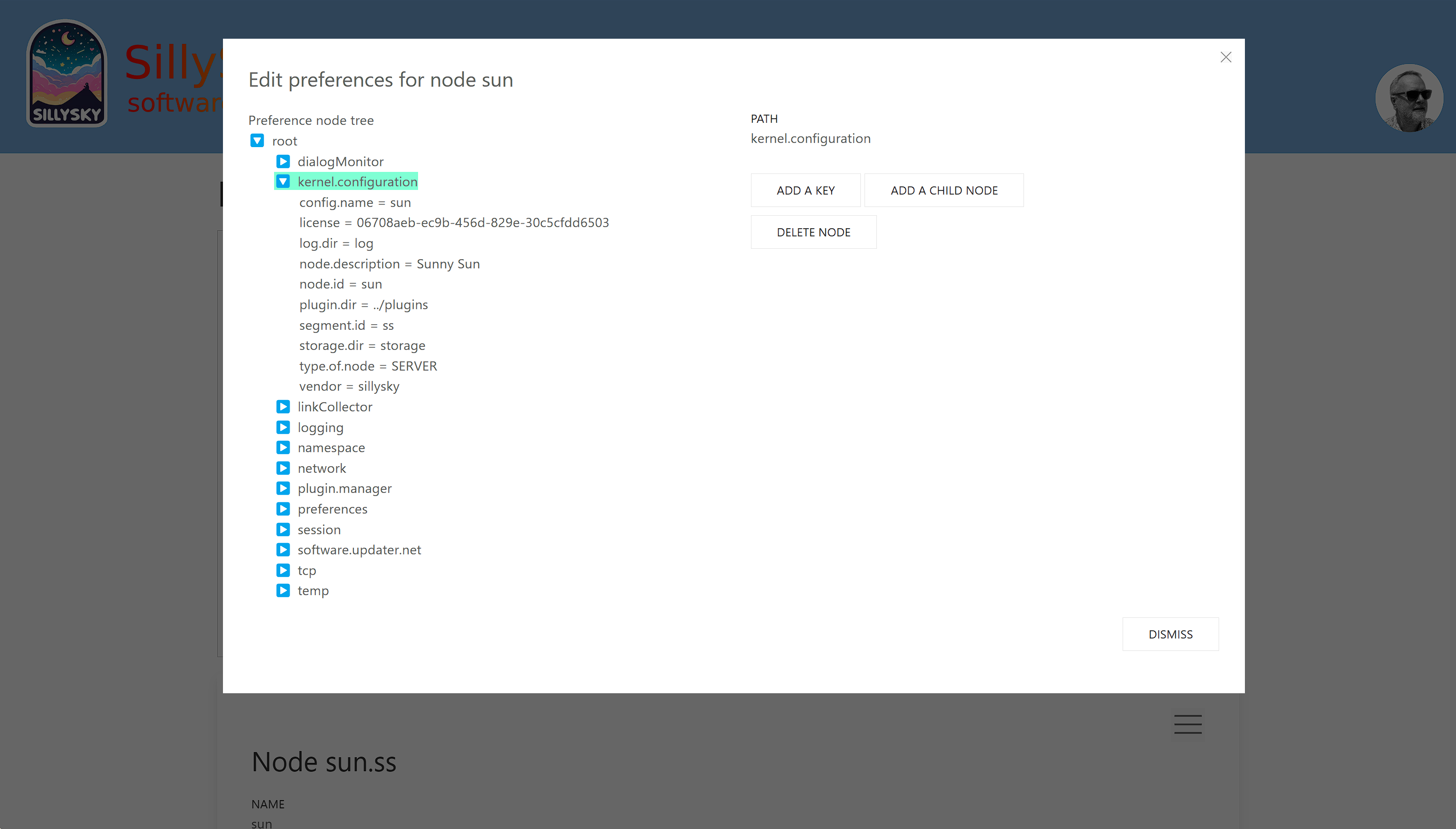
- Editing the Java preferences configuration of the node. Nodes save their settings in the Java preferences. As nodes are often not accessible via SSH, maintenance is carried out via the node network.
- Editing the configuration files of the selected node. These are read out when the node is booted and the values are transferred to the Java preferences.
The Node Manager is currently under development. It is intended to be the portal to the network in the future. Soon, it will be possible to:
- Manage the distributed file store system
- Configure logging
- Distribute plugins
- Update the software on the nodes
- Reboot the entire network
- and more...
RemoteSkin for Swing
When you start the Swing Client Node (earth), a login dialog appears. You need the following credentials:
user: admin
password: sillysky
After the connection is established, another dialog appears in which two demo applications can be started.
- Widget-Showcase (A dialog that displays widgets and their configuration in JSON)
- User-Manager (A dialog for managing users, roles and rights)
The last node (earth) is a client node and can be started multiple times. The applications can be started as often as desired.
Change it!
The demo environment is configured for use on one computer. If the nodes are to be run on different computers, the configuration files must be adapted. More nodes can also be added or removed. New nodes require unique node IDs.
License
Our Java framework is available for download. It is fully featured, allowing you to develop projects without any limitations. However, please note that for any commercial use, the purchase of a valid license is required.
nyssr.net is not open source, because we work for 100% on our projects. While we give away non-commercial licenses at no cost, we charge a fee for each commercially used nyssr.net node.
For more information visit this page.
Note
The JAR files (kernel, plug-ins) included in this download are fully operational and programmable. They have been compiled with JAVA 8; other JAVA versions are easily available on request (from JAVA version 8 upwards). Tell us what you need.
You can find more information and the documentation on sillysky.net. We are happy to answer questions by email or in our forum. Have fun trying it out!
If you would like us to develop a new application for you, or if an existing application is to be enhanced by nyssr.net, please let us know. Let us know what you would like to spend on the work. Just send us an email
Michael Hoppe
sillysky.net
February 24, 2025